NET + C#
严重影响DataGridView性能的2个属性
 管理员 发表于2017-05-13 浏览6191 评论0
前段时间写一段一个数据处理的东西,需要绑定一张DataTable到网格控件(我从DataGridView 继承),运行后发现,速度超级慢, 我最开始是因为继承的原因,后面发现不是,最后终于在*.Designer.cs找到了,原来我无意中在设计面板中改动了RowHeadersWidthSizeMode 属性 .
经过测试发现,RowHeadersWidthSizeMode属性和ColumnHeadersHeightSizeMod
NET + C#
.net 刷新后滚动条不动 加MaintainScrollPositionOnPostback=true 兼容gogle问题
管理员 发表于2017-05-12 浏览5119 评论0
在page里面设了MaintainScrollPositionOnPostback=true后,golgle浏览器并没有效果在page_load里面调用以下方法/// <summary>
/// 页面回传,保持当前滚动条位置
/// </summary>
/// <param&n
项目相关
UEditor chrome 点击上传文件选择框会延迟几秒才会显示 反应很慢
管理员 发表于2017-03-15 浏览4654 评论0
在谷歌浏览器里,使用Ueditor时有一个问题,就是在上传图片时,点击按钮弹出文件选择框时,大约需要8秒才能弹出解决方法: 1、单张图片:修改ueditor.all.js(ueditor.all.min.js)第24429行左右,将accept的值从image/*改成 image/jpeg,image/png,image/jpg,image/gif,image/bmp2、多张图片:修改dialogs/image/image.js的第370行左右,将mimeTypes的值从im
NET + C#
asp.net中http提交数据所遇到的那些坑
管理员 发表于2016-11-14 浏览4739 评论0
http提交数据有两种形式,get和post,不知道的同学请联系度娘。1、aspnet:MaxHttpCollectionKeys业务场景:业务很简单,手机端读取本地通讯录,将所有通讯录提交到后台,后台进行业务过滤,返回已属于当前用户好友所在的企业服务端接口定义如下: [HttpPost] public&nbs
NET + C#
C# 格式化文件大
管理员 发表于2013-08-15 浏览4040 评论0
private static string[] units = { "B", "KB", "MB", "GB", "TB", "EB", "ZB", "YB" };
public static string FormatBytes(long bytes)
{
double db = bytes;
未分类
WinRAR(64位)注册 注册码 key rarreg.key
管理员 发表于2013-08-06 浏览24469 评论2
———————————————————————————————
RAR registration data
wncn
Unlimited Company License
UID=1b064ef8b57de3ae9b52
64122122509b52e35fd885373b214a4a64cc2fc1284b77ed14fa20
66ebfca6509f9813b32960fce6cb5ffde62890079861be57638717
JavaScript 脚本
解决ie下鼠标移动到select option时,会丢失鼠标事件
管理员 发表于2013-04-22 浏览7223 评论1
$("#id").mouseleave(function (e) {
var o = e.relatedTarget || e.toElement;
if (!o) return; //增加移动到的对象判断,为option时退出
$(this).hide();
});
主要是 var o = e.relatedTarget || e.toElement; 这句
未分类
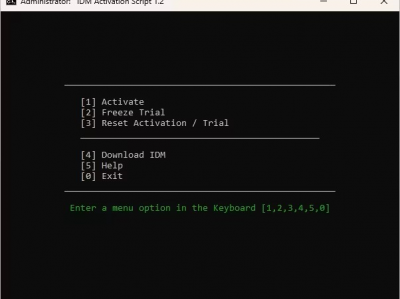
IDM命令行永久破解方法
管理员 发表于2013-03-28 浏览1905 评论0
原理:锁定住30天试用期,如果失效,可以尝试免安装重新激活。
1:首先,从 IDM 网站下载 IDM
2:在电脑上安装 IDM
3:现在在 Windows 中搜索 "PowerShell "并打开 PowerShell
NET + C#
让你的.NET程序兼容不同版本的Dll文件
管理员 发表于2012-03-10 浏览3664 评论0
前段时间写的一个winform的.net程序。因为引用了不少的库文件,但是最近这些库文件因为修正了一些bug和算法。但是主的程序文件没有怎么改动。所以就不像把这个主程序重新编译了。于是就把所有的新版dll文件拷贝到运行目录下,希望主程序能够直接调用新版的库文件。结果发现原来这些库文件都用strong name签了名的。主程序一调用就出错,说找不到该版本的文件。
CSS书写
IE6下导航栏li标签设置float属性后宽度不能自适应的解决办法
管理员 发表于2011-08-17 浏览3900 评论0
当上面代码的<li>标签设置float:left属性后,在IE6下li的宽度不能自动适应,解决的方法就是将<a>标签也添加float:left属性。